



Know exactly what
you're eating.

Snap a photo and get detailed nutrition data in seconds. Calories, macros, and up to 90+ micronutrients from verified sources.

SavorAI app preview
★★★★★ 5-star rated
400K+ Foods Verified
Up to 90+ Nutrients Tracked

Built for how you
actually eat.

Most trackers are slow, inaccurate, or both. We fixed that.

Camera icon for photo logging

Snap & Track

Ingredients mode identifies ingredients and portions. Estimate mode logs official nutrition facts from a label or menu.

Lightning icon for fast meal logging

Lightning Fast

Log a full meal in under 10 seconds. Spend your time eating, not data-entering.

Bullseye icon for accurate nutrition data

Lab-Grade Accuracy

Data from USDA, CNF, and verified sources. Within 10–15% of laboratory analysis.

400,000+ foods. Up to 90+ nutrients. 8-second average.

Three steps. That's it.

1

Capture

Take a photo of your meal. Any cuisine, any setting, any lighting.

2

Refine

Review AI-identified ingredients. Adjust portions with a tap if needed.

3

Understand

Get the full picture: calories, macros, and up to 90+ micronutrients. Spot trends over days, weeks, and months.

Ingredients mode

Ingredients mode breaks a meal into its individual ingredients, estimates the weight of each, and matches each one to an entry from government food composition databases like USDA and CNF. It's best for home-cooked meals and whole foods, where accuracy depends mostly on getting the portion sizes right.

Estimate mode

Estimate mode matches nutrition numbers you already have. If a restaurant or package lists its nutrition facts, you can photograph the label or a screenshot of the nutrition page, and SavorAI logs those exact values. It's best for chain restaurants and packaged foods, where the official numbers are more reliable than any estimate from a photo.

Both modes accept context: you can add the weight, volume, cooking method, or how much of the portion you actually ate, by typing or by voice, to improve the result.

Numbers you can
actually use.

When other apps give rough estimates, we give you data from government-verified food composition databases.

  • ✓ Up to 90+ vitamins & minerals tracked
  • ✓ Within 10-15% of laboratory analysis
  • ✓ Amino acids, fatty acids & more
  • ✓ Data quality scores for transparency

Powered by USDA, CNF, and other verified composition databases.

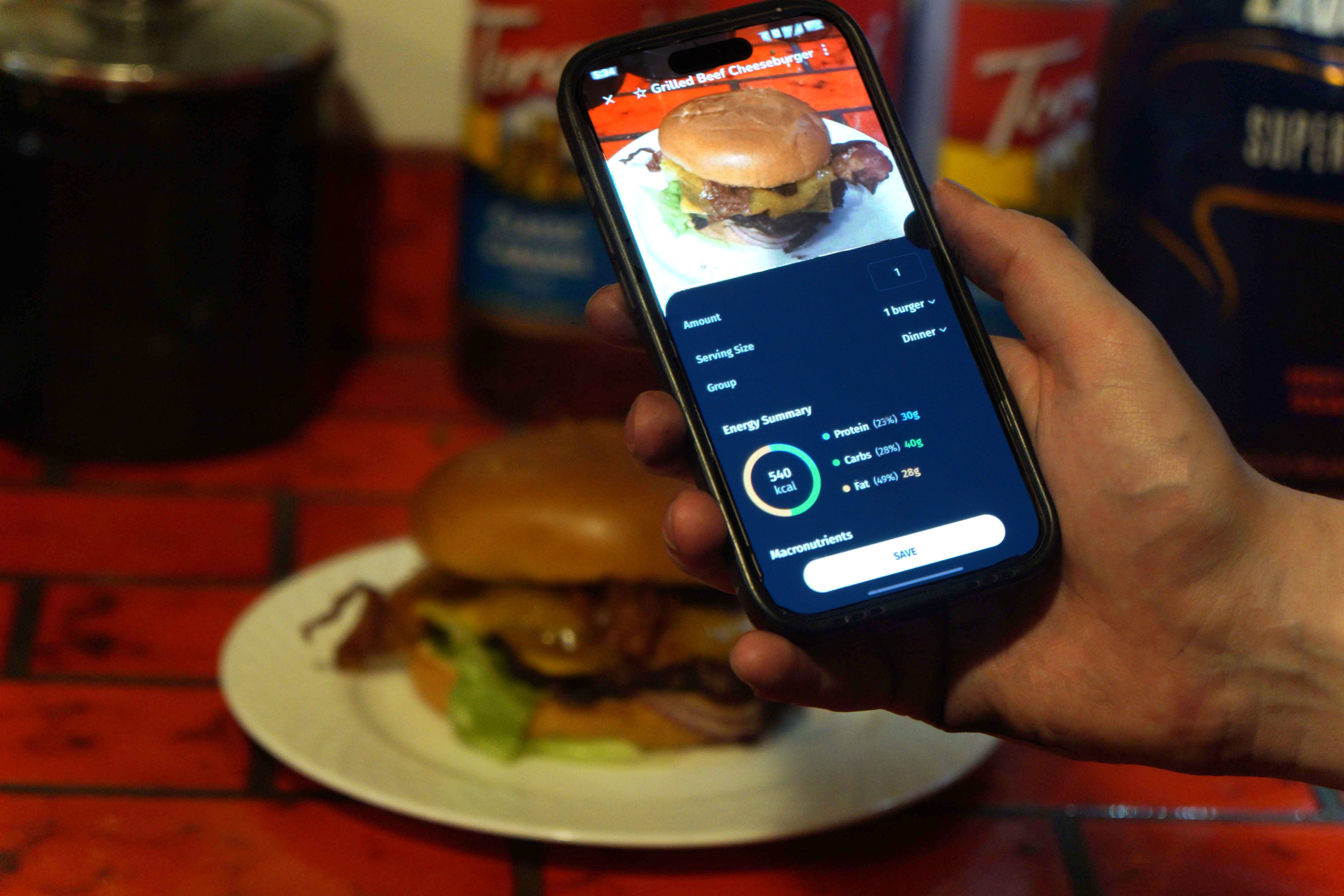
Nutrition analysis of a burger

What our users are saying.

★★★★★
“I used to spend 10 minutes per meal searching in other apps. Now I photograph my plate and everything is logged in seconds. My dietitian confirmed the macros match her calculations.”
MH
Michelle H. Fitness Enthusiast
★★★★★
“Three months of consistent tracking and I finally hit my protein targets. Being able to adjust portions with a tap makes all the difference.”
DC
Dan C. Personal Trainer
★★★★★
“I recommend SavorAI to every client. One found out she was low on iron and vitamin D, which her old tracker never even showed. Nothing else goes this deep on micronutrients.”
RM
Rachel M. Registered Nutritionist

See what's really
in your food.

Detailed nutrition data from a single photo. Try it free.

FAQ

Common questions about SavorAI, how it works, and what it tracks.

How is SavorAI different from other calorie counter apps?

Many apps make you search, scroll, and guess. Others promote AI features but don't deliver on accuracy. SavorAI combines ease-of-use with advanced features that allow you to get lab-grade accuracy while being able to track consistently so you can make healthier choices.

What nutrients does SavorAI track?

SavorAI tracks calories and macros (protein, carbs, fat) plus up to 90+ vitamins and minerals. Depending on the food, you may see additional details like amino acids and fatty acids. This helps you go beyond a simple calorie counter and understand food quality.

Does it work for restaurant meals and packaged foods?

Yes. Ingredients mode is best for home-cooked meals and whole foods. Estimate mode is best for chain restaurants and packaged foods: photograph the nutrition label or a screenshot of the nutrition page, and SavorAI logs those exact values. You can review and adjust either result.

Where does the nutrition data come from?

We prioritize verified food composition sources and make it clear when data quality is high vs. uncertain. You'll see references like USDA and CNF for many foods, along with other verified composition databases when relevant.

Is it accurate enough to rely on day-to-day?

No nutrition app can be perfect, but accuracy and transparency are core goals for SavorAI. When foods have strong reference data, your numbers will be close to lab analysis. When foods are harder to estimate, you can adjust ingredients and portions using the built-in tools.

Do I need to type anything?

Not usually. You can log with a photo, a barcode, a nutrition label, a typed or spoken description, or a database search. The usual path is photo, then review, then log. The app is available in English and Spanish.

Is SavorAI good for weight loss, muscle gain, or performance?

Detailed tracking helps you understand patterns over time: where your calories come from, whether your protein is high enough, and how micronutrients shift with different foods. You can absolutely lose weight, gain muscle, or improve performance by staying on top of what you eat. That said, SavorAI is not medical advice; if you have a specific condition or therapeutic diet, confirm targets with a professional.

Is SavorAI free?

Yes. Enough of it is free that you can build a real habit. Most AI features are available every day, so you can keep logging without hitting a wall. When you want unlimited access and our most advanced tools, Premium is there.

Do you sell my data?

We take privacy seriously and never sell data to any third party ever. The best source of truth is our Privacy Policy, which explains what we collect, how we use it, and what choices you have. If you ever want to remove your account information, you can use the Data Deletion page or contact us directly.

How do I request deletion of my data?

You can review our Privacy Policy and request account/data deletion via our Data Deletion page. If you need help, you can always reach out on the Contact page.

My scans aren't accurate enough, how can I improve the results?

Ingredients mode breaks a meal into its individual ingredients, estimates the weight of each, and matches each one to an entry from government food composition databases like USDA and CNF. It is best for home-cooked meals and whole foods, where accuracy depends mostly on getting the portion sizes right.

Estimate mode matches nutrition numbers you already have. If a restaurant or package lists its nutrition facts, photograph the label or a screenshot of the nutrition page, and SavorAI logs those exact values. It is best for chain restaurants and packaged foods, where the official numbers are more reliable than any estimate from a photo.

Both modes accept context: you can add the weight, volume, cooking method, or how much of the portion you actually ate, by typing or by voice, to improve the result.

How do I report an issue?

In the app, you can go to Settings -> About -> Report an Issue. Alternatively, you can email [email protected] for support.

How do I log a food when I don't know the weight?

When you use AI description or context tools, you can simply input the volume (ie "one large bowl" or "two small cups") and the app will automatically estimate the weight for you. For manual logging, you can press on the "Serving Size" dropdown, then press "Custom", where you can describe your custom serving size (ie "one slice" or "two tablespoons"). Weight will be estimated typically based on ground-truth density knowledge.

Start Tracking Free